
SERVICE BULLETIN Fujitsu General America, Inc.
Number: S025 353 Route West. Fairfield, NJ 07004
Date: 12/13/2017 Ph: 888-888-3424 Fx: 973-836-0449
Type: Field Em: ServiceHVAC@fujitsugeneral.com
VR-II Heat Recovery RBU Mode Changeover
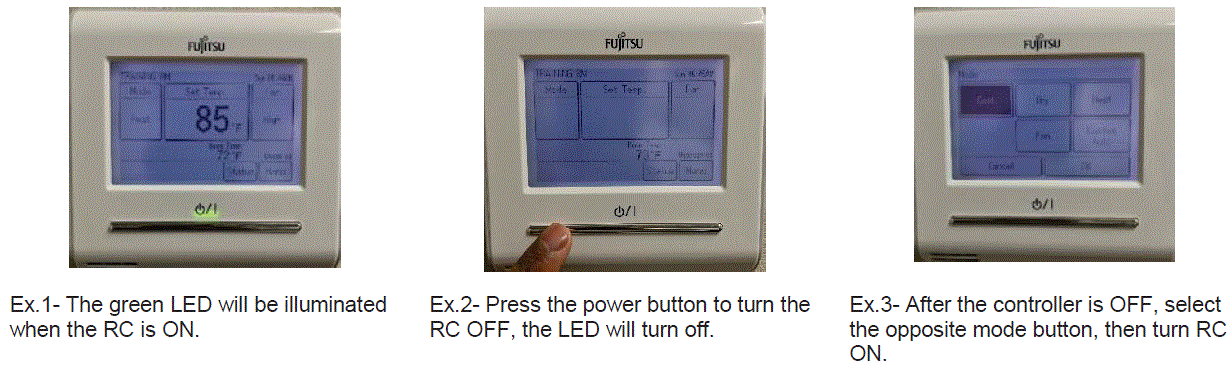
When (2) or more indoor units are piped together onto (1) RBU port, operated by (1) Remote Control (RC) daisy chained to all units, an opposite mode change must be performed manually. When changing to the opposite mode, you MUST first turn the units OFF at each Remote Control. After a minimum of (2) minutes, you may select the opposite mode, then turn each RC ON. This will ensure the indoor units will now operate in the same mode.
NOTE: Auto and Fan modes are disabled in this configuration.
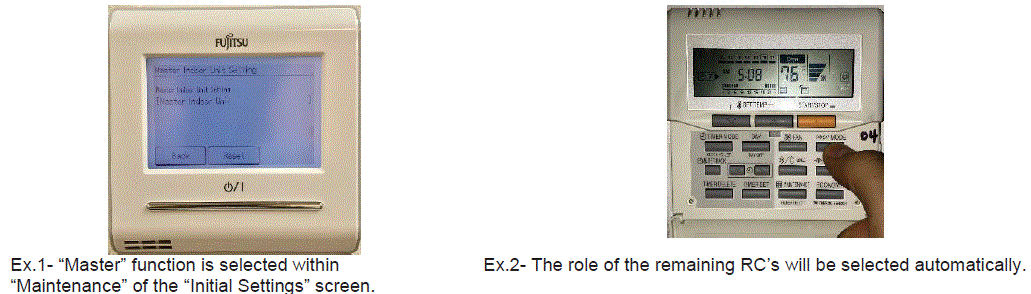
 When (2) or more indoor units are piped together onto (1) RBU port, with individual Remote Controls, one RC MUST be designated as a "Master". Selecting one RC as "Master" will automatically configure the other Remote Control(s) to the "Slave" function. The Master RC will determine the Slave RC mode, thus locking out and ability to change or view the opposite mode at the Slave RC.
Example: If the Master RC is in HEAT mode, the Slave RC mode will be HEAT. The opposite mode (Cool) will not be displayed on the Slave RC, and the Slave RC cannot switch modes. Mode changeover can only be performed from the Master RC, without having to turn OFF the Slave RC's.
Please refer to the VR-II Design & Technical Manual for further Remote Control wiring and application options.
Attached: S Bulletin 025 - Multi Indoor RBU Mode Changes
Disclaimer:
Always Practice Safety First. Turn off power before commencing any work. In order to perform some of these tests an electrical and/or refrigerant license is required. We strongly advise to check the Service manual for more detailed explanation. If you are not sure about these recommendations please contact our technical support line at 866-952-8324. Fujitsu General America, Inc. is not responsible for any damage and/or harm caused by unsafe acts during these test.
Comments
0 comments
Please sign in to leave a comment.